• Recent
    • Docs
    • Github
    • 百度网盘
    • Google
    • Official
    • Shop
    • Register
    • Login

    Cool Pi Cm5-Laptop Linux Quick Start Guide

    Scheduled Pinned Locked Moved PI CM5 Laptop
    73 Posts 14 Posters 17.0k Views
    Loading More Posts
    • Oldest to Newest
    • Newest to Oldest
    • Most Votes
    Reply
    • Reply as topic
    Log in to reply
    This topic has been deleted. Only users with topic management privileges can see it.
    • M
      mainbord @petersen77
      last edited by

      Hi help me please to find firmware for laptop, I Flashed ubuntu-24.04-preinstalled-desktop-arm64-coolpi-0926.img from google and it does not boot.

      M 1 Reply Last reply Reply Quote 1
      • M
        Momo 0 @mainbord
        last edited by

        @mainbord for me currently only the Debian image works

        M 1 Reply Last reply Reply Quote 0
        • M
          mainbord @Momo 0
          last edited by

          @Momo-0 said in Cool Pi Cm5-Laptop Linux Quick Start Guide:

          @mainbord for me currently only the Debian image works

          Thanks, 11 debian booted. Because this is an old image.

          P M 2 Replies Last reply Reply Quote 1
          • P
            petersen77 @mainbord
            last edited by

            @mainbord Debian 13 is also working, but no EXFAT support in the kernel, so it's a little bit inconvenient copying files (e.g. my Camera is using EXFAT) or making backups

            M 1 Reply Last reply Reply Quote 1
            • M
              Momo 0 @petersen77
              last edited by

              @petersen77 i got around this with installing exfat-progs and exfatfuse i think, after installing i needed to create a symlink like this "sudo ln -s /usr/sbin/mount.exfat-fuse /sbin/mount.exfat"

              https://unix.stackexchange.com/questions/607949/cannot-mount-exfat-even-installed-exfat-fuse-exfat-utils-in-kali-linux

              but yeah being able to compile the kernel or have this and some other features (vpn, filesystem encryption) in the kernel from the beginning for example would be better

              P 1 Reply Last reply Reply Quote 0
              • P
                petersen77 @Momo 0
                last edited by

                @Momo-0 Thanks, it's working now.

                1 Reply Last reply Reply Quote 1
                • M
                  mainbord @mainbord
                  last edited by

                  @mainbord
                  I boot from ubuntu 24.04 hdmi and usb 2.0 works. Usbc wi-fi and lcd do not work. This image not for laptop. Latest kernel source not for laptop too.

                  G 1 Reply Last reply Reply Quote 1
                  • G
                    george @mainbord
                    last edited by

                    @mainbord
                    Use the following command to generate a deb file and then install it.

                    ./build-kernel.sh arm64
                    
                    M P 2 Replies Last reply Reply Quote 0
                    • M
                      mainbord @george
                      last edited by mainbord

                      @george said in Cool Pi Cm5-Laptop Linux Quick Start Guide:

                      Use the following command to generate a deb file and then install it.

                      It was hard. Now it works but without wi-fi and sound

                      How to install mainline kernel 6.18?

                      1 Reply Last reply Reply Quote 0
                      • P
                        petersen77 @george
                        last edited by petersen77

                        @george Can't finish the job. Btrfs module keeps sending an error when building the modules. The script doesn't finish.

                        M 1 Reply Last reply Reply Quote 1
                        • M
                          mainbord @petersen77
                          last edited by

                          Tyied it
                          https://github.com/armbian/build/pull/8275
                          from usb and from nand it does not boot.

                          M 1 Reply Last reply Reply Quote 0
                          • M
                            Momo 0 @mainbord
                            last edited by

                            @mainbord same here, sadly Armbian isnt booting or else i would already be using it instead of the supplied distros

                            G 2 Replies Last reply Reply Quote 0
                            • G
                              george @Momo 0
                              last edited by

                              @Momo-0
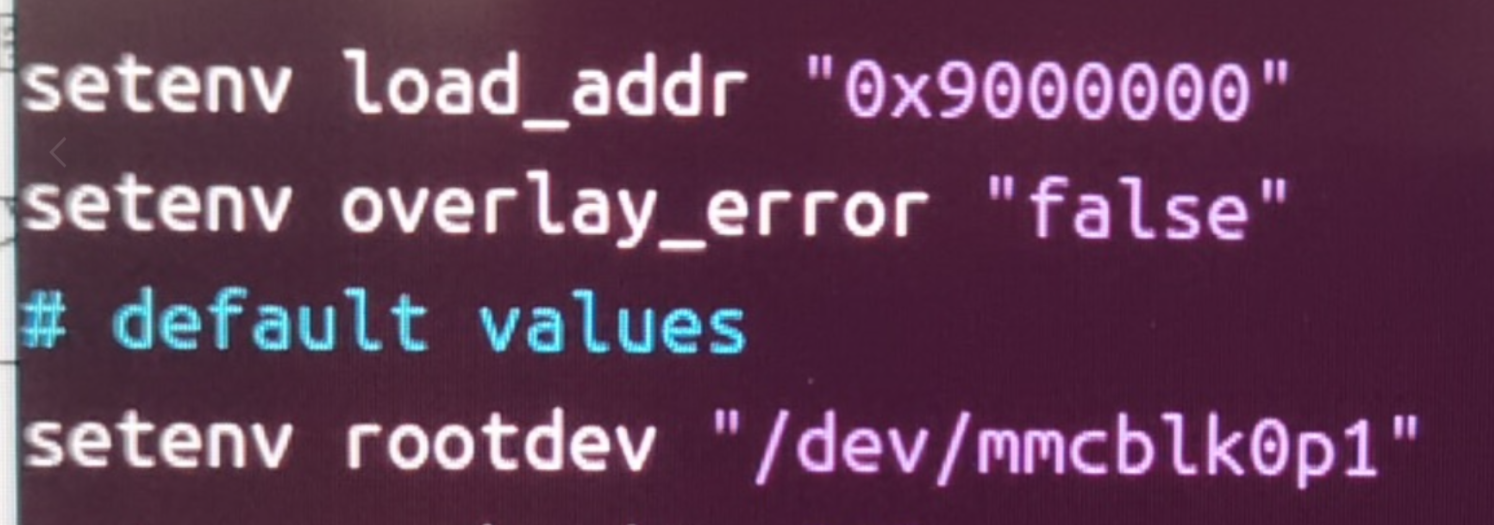
                              The official default configuration of ARMBIN's loadaddr and optee conflicts and needs to be modified to 0x200000
                              cb18db20-04ac-4ee6-8b1b-d358c17d75f9-image.png

                              M 1 Reply Last reply Reply Quote 0
                              • M
                                Momo 0 @george
                                last edited by

                                @george is this true even for the community made Genbook build?

                                M 1 Reply Last reply Reply Quote 0
                                • M
                                  mainbord @Momo 0
                                  last edited by mainbord

                                  @Momo-0
                                  I did it

                                  change address 0x200000
                                  build
                                  burn it to emmc
                                  profit
                                  Linux coolpi-genbook 6.18.0-edge-rockchip64 #1 SMP PREEMPT Mon Dec 1 01:42:10 MSK 2025 aarch64 aarch64 aarch64 GNU/Linux

                                  wireless works

                                  no sound
                                  No usb-c

                                  M 1 Reply Last reply Reply Quote 0
                                  • M
                                    Momo 0 @mainbord
                                    last edited by

                                    @mainbord too bad about the usbc and the sound, can i ask how you went about it? im not to deep into armbian.

                                    1 Reply Last reply Reply Quote 0
                                    • G
                                      george @Momo 0
                                      last edited by

                                      @Momo-0
                                      TYPEC is only related to DTS, and the main issue with the sound card is Tinymix configuration.

                                      M M 2 Replies Last reply Reply Quote 0
                                      • M
                                        Momo 0 @george
                                        last edited by

                                        @georgecould you elaborate on how to build and change the Kernel from the current github repository?

                                        G 1 Reply Last reply Reply Quote 0
                                        • G
                                          george @Momo 0
                                          last edited by

                                          @Momo-0

                                          git checkout 6.1.75
                                          ./build-kernel.sh arm64
                                          

                                          The deb file will be generated in the higher-level directory of the code and copied to the machine for installation.

                                          M 1 Reply Last reply Reply Quote 0
                                          • M
                                            mainbord @george
                                            last edited by

                                            @george

                                            Armbian use this file from linux kernel
                                            https://github.com/torvalds/linux/blob/master/arch/arm64/boot/dts/rockchip/rk3588-coolpi-cm5-genbook.dts

                                            George use this
                                            https://github.com/coolpi-george/coolpi-kernel/blob/linux-6.1-stan-rkr5.1/arch/arm64/boot/dts/rockchip/rk3588-cpcm5-notebook-v20.dts

                                            I found instruction how to build my own dts
                                            https://docs.armbian.com/User-Guide_Armbian_overlays/

                                            But i can't build even the linux kernel dts file
                                            sudo armbian-add-overlay rk3588-coolpi-cm5-genbook.dts

                                            1 Reply Last reply Reply Quote 0
                                            • 1
                                            • 2
                                            • 3
                                            • 4
                                            • 1 / 4
                                            • First post
                                              Last post