Cool Pi Cm5-Laptop Linux Quick Start Guide
-
@Momo-0
The mirror in May will include this modification. -
@george any chance you could include the wireguard kernel modules too in these images?
-
@Momo-0
Apply the following patch and compile to replace the kernel.diff --git a/arch/arm64/configs/coolpi_linux_defconfig b/arch/arm64/configs/coolpi_linux_defconfig index ad6ce0822318..9e8eef746b06 100755 --- a/arch/arm64/configs/coolpi_linux_defconfig +++ b/arch/arm64/configs/coolpi_linux_defconfig @@ -313,6 +313,7 @@ CONFIG_BLK_DEV_DM=y CONFIG_DM_THIN_PROVISIONING=y CONFIG_NETDEVICES=y CONFIG_DUMMY=y +CONFIG_WIREGUARD=y CONFIG_MACVLAN=y CONFIG_IPVLAN=y CONFIG_VXLAN=y -
@george said in Cool Pi Cm5-Laptop Linux Quick Start Guide:
@yfblock
Test several USB drives and find a USB 2.0 interface drive. There may be compatibility issues with USB3.0.interesting conversation… I wonder if the notebook/ SoC is supported something like a uefi boot already, from your suggestion it seems like the case, no?
-
@ngavarta just got mine, can’t wait to hands on my new toy

-
EXFAT is still not in the kernel. It also seems that the building process is broken, so I can't implement it. Please check.
Best regards,
Peter -
append this to file
arch/arm64/configs/coolpi_linux_defconfig, compile kernel and install to /boot/firmwareCONFIG_EXFAT_FS=y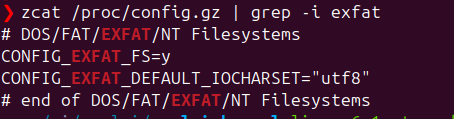
-
This post is deleted! -
@berkaroad The generated files are not complete so WiFi, opengl and many more is not working.
-
can we get some updated instructions in general? The repo on the first page doesnt seem to be the current one, and every build i do from the Current one doesnt seem to boot on my laptop.
-
@Momo-0 The same here, I cannot replace the standard kernel with EXFAT support.
-
Hi help me please to find firmware for laptop, I Flashed ubuntu-24.04-preinstalled-desktop-arm64-coolpi-0926.img from google and it does not boot.
-
@mainbord for me currently only the Debian image works
-
@Momo-0 said in Cool Pi Cm5-Laptop Linux Quick Start Guide:
@mainbord for me currently only the Debian image works
Thanks, 11 debian booted. Because this is an old image.
-
@mainbord Debian 13 is also working, but no EXFAT support in the kernel, so it's a little bit inconvenient copying files (e.g. my Camera is using EXFAT) or making backups
-
@petersen77 i got around this with installing exfat-progs and exfatfuse i think, after installing i needed to create a symlink like this "sudo ln -s /usr/sbin/mount.exfat-fuse /sbin/mount.exfat"
but yeah being able to compile the kernel or have this and some other features (vpn, filesystem encryption) in the kernel from the beginning for example would be better
-
@Momo-0 Thanks, it's working now.
-
@mainbord
I boot from ubuntu 24.04 hdmi and usb 2.0 works. Usbc wi-fi and lcd do not work. This image not for laptop. Latest kernel source not for laptop too. -
@mainbord
Use the following command to generate a deb file and then install it../build-kernel.sh arm64 -
@george said in Cool Pi Cm5-Laptop Linux Quick Start Guide:
Use the following command to generate a deb file and then install it.
It was hard. Now it works but without wi-fi and sound
How to install mainline kernel 6.18?