• Recent
    • Docs
    • Github
    • 百度网盘
    • Google
    • Official
    • Shop
    • Register
    • Login
    1. Cool Pi For You
    2. george
    3. Posts
    G
    • Profile
    • Following 0
    • Followers 4
    • Topics 73
    • Posts 886
    • Groups 2

    Posts

    Recent Best Controversial
    • RE: CSI支持

      @jugg 可以支持2个4line或者4个2line的摄像头模组,比如IMX219接口可以支持4个同时工作。

      posted in Pi CM5
      G
      george
    • RE: Micro DisplayPort question

      @murraytodd Insert your DP cable and print the mesg upload.

      posted in Pi 4B
      G
      george
    • RE: Coolpi 4B not booting!

      @Pharizna Please upgrade the loader to the latest version, format EMMC or TF card, and remake the boot image.

      posted in Pi 4B
      G
      george
    • RE: cool pi 4b RebornOS support

      @Pharizna Can other systems, such as ubuntu, be connected properly

      posted in News
      G
      george
    • RE: How to install OpenCL/Kronos/OpenGL on CM5-EVB

      @tmb68 said in How to install OpenCL/Kronos/OpenGL on CM5-EVB:

      Can anyone provide the steps required to install OpenCL/Kronos/OpenGL on the CM5-EVB?
      Looking for support for the Mali-G610, not seeing UserSpace files on ARM or Rockchip sites.
      Thanks,
      TMB

      The released Ubuntu system image is already integrated with G610 driver by default

      posted in Pi CM5
      G
      george
    • RE: cool pi 4b RebornOS support

      @Pharizna Please take a photo of the front of your machine.

      posted in News
      G
      george
    • A Method for Dynamically Hiding the Status Bar on Android 11
      diff --git a/packages/SystemUI/src/com/android/systemui/statusbar/phone/PhoneStatusBar.java b/packages/SystemUI/src/com/android/systemui/statusbar/phone/PhoneStatusBar.java
      index c1d54b7..6228ef0 100755
      --- a/packages/SystemUI/src/com/android/systemui/statusbar/phone/PhoneStatusBar.java
      +++ b/packages/SystemUI/src/com/android/systemui/statusbar/phone/PhoneStatusBar.java
      @@ -202,6 +202,8 @@ import java.util.Map;
       public class PhoneStatusBar extends BaseStatusBar implements DemoMode,
               DragDownHelper.DragDownCallback, ActivityStarter, OnUnlockMethodChangedListener {
           static final String TAG = "PhoneStatusBar";
      +    static final String HIDE_NAVIGATION_BAR = "android.intent.action.HIDE_NAVIGATION_BAR";
      +    static final String SHOW_NAVIGATION_BAR = "android.intent.action.SHOW_NAVIGATION_BAR";
           public static final boolean DEBUG = BaseStatusBar.DEBUG;
           public static final boolean SPEW = false;
           public static final boolean DUMPTRUCK = true; // extra dumpsys info
      @@ -1090,6 +1092,8 @@ final Object mScreenshotLock = new Object();
                   filter.addAction("fake_artwork");
               }
               filter.addAction(ACTION_DEMO);
      +		    filter.addAction(HIDE_NAVIGATION_BAR);
      +        filter.addAction(SHOW_NAVIGATION_BAR);
               context.registerReceiverAsUser(mBroadcastReceiver, UserHandle.ALL, filter, null, null);
       
               // listen for USER_SETUP_COMPLETE setting (per-user)
      @@ -1381,6 +1385,12 @@ final Object mScreenshotLock = new Object();
                    return false;
                }
            };
      +	 
      +	    private void removeNavigationBar() {
      +        if (mNavigationBarView == null) return;
      +        		mWindowManager.removeView(mNavigationBarView);
      +        		mNavigationBarView = null;
      +      }	
             //$_rbox_$_modify_$_huangjc,add add/remove bar button	
             private View.OnTouchListener mHidebarPreloadOnTouchListener = new View.OnTouchListener() {
       
      @@ -1475,6 +1485,32 @@ final Object mScreenshotLock = new Object();
               mWindowManager.addView(mNavigationBarView, getNavigationBarLayoutParams());
           }
       
      +	  private void addNavigationBarInnerLocked(){
      +	      if(mNavigationBarView == null){
      +		       mNavigationBarView = (NavigationBarView) View.inflate(mContext, R.layout.navigation_bar, null);	
      +			     mNavigationBarView.setDisabledFlags(mDisabled);
      +			     mNavigationBarView.setBar(this);
      +			     mNavigationBarView.setOnTouchListener(new View.OnTouchListener() {
      +				@Override
      +				public boolean onTouch(View v, MotionEvent event) {
      +					checkUserAutohide(v, event);
      +					return false;
      +				}});
      +		    if (mNavigationBarView == null) return;
      +		
      +		       prepareNavigationBarView();
      +		      try {
      +		           mWindowManager.addView(mNavigationBarView, getNavigationBarLayoutParams());
      +		            } catch (Exception e) {
      +                  }	
      +	      }
      +    }
      +    public void displayNavigation(){
      +    	addNavigationBarInnerLocked();
      +    }
      +    public void hideNavigation(){
      +    	removeNavigationBar();
      +    }
           private void repositionNavigationBar() {
               if (mNavigationBarView == null || !mNavigationBarView.isAttachedToWindow()) return;
       
      @@ -3436,7 +3472,11 @@ final Object mScreenshotLock = new Object();
                       if (DEBUG_MEDIA_FAKE_ARTWORK) {
                           updateMediaMetaData(true);
                       }
      -            }
      +            }else if(HIDE_NAVIGATION_BAR.equals(action)){
      +               hideNavigation();
      +            }else if(SHOW_NAVIGATION_BAR.equals(action)){
      +               displayNavigation();
      +		}
               }
           };
      
      posted in Pi 4B
      G
      george
    • RE: Introduction to COOL PI CM5 interface

      @wuming 可以尝试按照下面帖子步骤处理:
      https://askubuntu.com/questions/1326386/ubuntu-20-04-lts-driver-intel-wi-fi-6e-ax210-160mhz

      posted in Pi CM5
      G
      george
    • RE: Introduction to COOL PI CM5 interface

      @wuming dmesg| grep hci0

      posted in Pi CM5
      G
      george
    • RE: Introduction to COOL PI CM5 interface

      @wuming
      IMX219
      【淘宝】https://m.tb.cn/h.UtvVLeM?tk=xKy7dm9s4XE CZ3457 「英伟达Jetson Nano摄像头模组 800万像素 IMX219芯片广角160度」
      点击链接直接打开 或者 淘宝搜索直接打开
      OV5647
      【淘宝】https://m.tb.cn/h.Utv42LD?tk=6mA3dm9HRea CZ3457 「OV5647摄像头 OV5647模块适用于Raspberry Pi 500万像素 广角65度」
      点击链接直接打开 或者 淘宝搜索直接打开
      除了摄像头模组以外,CM5的机器还需要增加一根转接排线,预计下周各个店铺会上线转接排线。

      posted in Pi CM5
      G
      george
    • RE: 桌面抓取

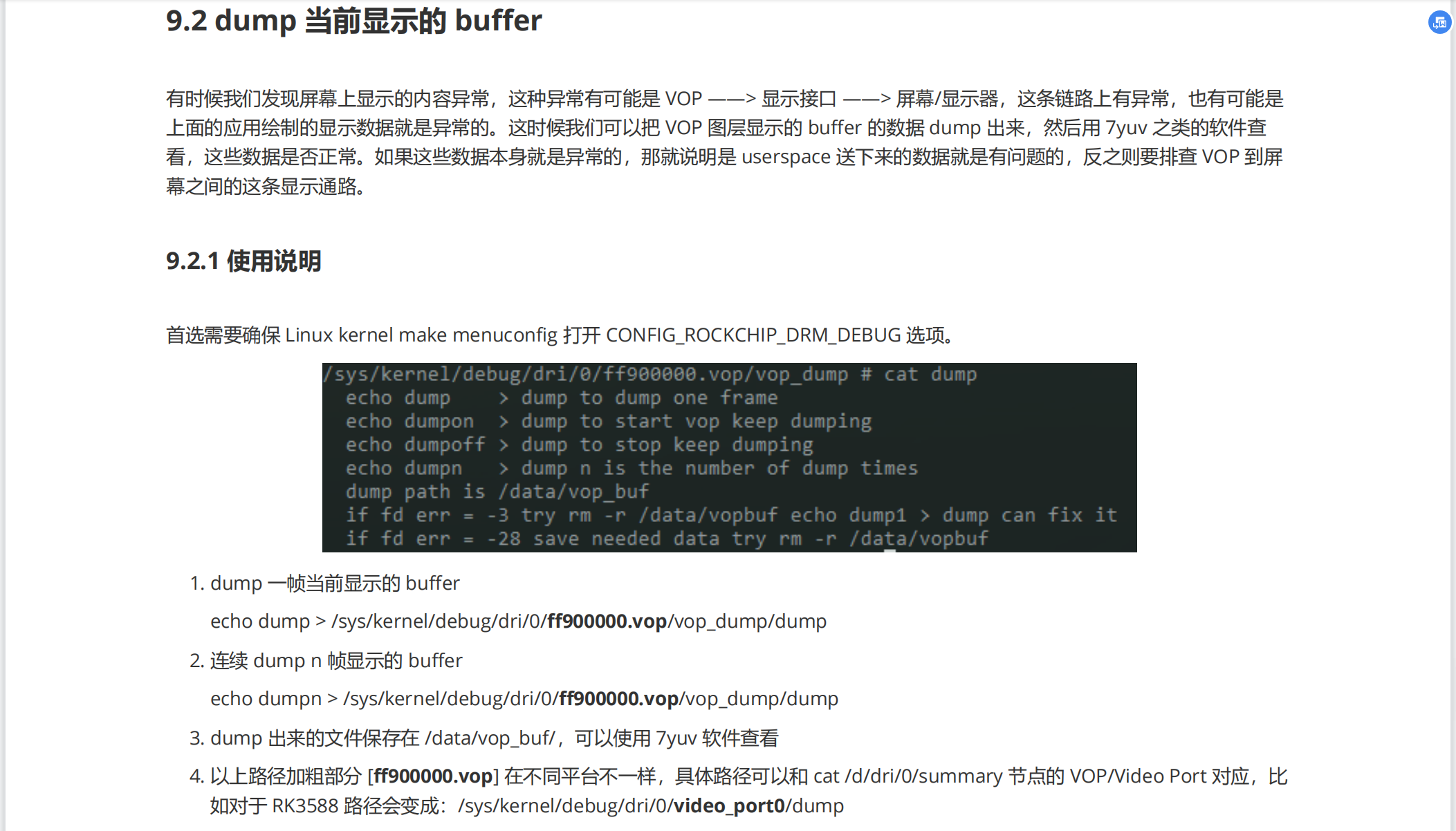
      @jugg 还可以参考下图方法直接dump出buffer
      4576f6c9-670c-4d3e-a852-edb90eb4874f-image.png

      posted in Ubuntu
      G
      george
    • RE: 桌面抓取

      @jugg
      可以参考这个:
      https://gitee.com/andyshrk/drm/blob/master/tests/ovltest/ovltest.c
      或者 drm 下面writeback 的使用方法参考:
      https://patchwork.kernel.org/project/dri-devel/patch/20220812231757.1454-3-quic_rohiiyer@quicinc.com/

      posted in Ubuntu
      G
      george
    • RE: CoolPi 4B硬件如何扩展 CAN接口

      @Tourists-0 下面这个帖子有介绍GPIO的功能复用,40PIN 可以扩展两路CAN出来。
      https://www.cool-pi.com/topic/68/coolpi-4b硬件扩展一-40pin接口介绍?_=1682384241578

      posted in Hardware
      G
      george
    • RE: Introduction to COOL PI CM5 interface

      @wuming 机器的40pin排针旁边有版本号

      posted in Pi CM5
      G
      george
    • RE: Introduction to COOL PI CM5 interface

      @wuming 你手上是V10的机器吗?V10的暂时不支持蓝牙!可以联系一下代理更换一下V11的底板。

      posted in Pi CM5
      G
      george
    • RE: Introduction to COOL PI CM5 interface

      @wuming lsusb 发一下结果,然后内核要同步到最新。

      posted in Pi CM5
      G
      george
    • RE: cool pi 4b RebornOS support

      @Pharizna Try using a USB disk or SDcard to start

      posted in News
      G
      george
    • RE: Introduction to COOL PI CM5 interface

      @wuming 恭喜!!有空的话可以整理一下你的调试步骤,方便后面进来的小伙伴学习。

      posted in Pi CM5
      G
      george
    • RE: Full Record of CM5 Running ChatGLM-MNN Big Language Model

      @顾真牛 他如果需要环境调试,我们可以提供。

      posted in AI Algorithm
      G
      george
    • Full Record of CM5 Running ChatGLM-MNN Big Language Model

      This example is based on the COOLPI CM5 32G memory version, and the system is ubuntu20.04.

      • Download ChatGLM-MNN project
      git clone https://github.com/wangzhaode/ChatGLM-MNN.git
      
      • Compile MNN library
      git clone https://github.com/alibaba/MNN.git
      cd MNN
      mkdir build && cd build
      cmake .. # CPU only
      make -j8
      cp -r ../include ../../ChatGLM-MNN/
      cp libMNN.so ../../ChatGLM-MNN/libs
      cp express/libMNN_Express.so ../../ChatGLM-MNN/libs
      
      • Download Models
      cd ChatGLM-MNN/resource/models
      ./download_models.sh int8
      cp int8/* ./
      
      • Build
      mkdir build
      cd build
      cmake ..
      make -j8
      
      • Run
      coolpi@Ubuntu:~/share/ChatGLM-MNN/build$ ./cli_demo    
      The device support i8sdot:1, support fp16:1, support i8mm: 0
      Can't Find type=2 backend, use 3 instead
      load ../resource/tokenizer/slim_vocab.txt ... Done!
      load ../resource/models/glm_block_0.mnn model ... Done!
      load ../resource/models/glm_block_1.mnn model ... Done!
      load ../resource/models/glm_block_2.mnn model ... Done!
      load ../resource/models/glm_block_3.mnn model ... Done!
      load ../resource/models/glm_block_4.mnn model ... Done!
      load ../resource/models/glm_block_5.mnn model ... Done!
      load ../resource/models/glm_block_6.mnn model ... Done!
      load ../resource/models/glm_block_7.mnn model ... Done!
      load ../resource/models/glm_block_8.mnn model ... Done!
      load ../resource/models/glm_block_9.mnn model ... Done!
      load ../resource/models/glm_block_10.mnn model ... Done!
      load ../resource/models/glm_block_11.mnn model ... Done!
      load ../resource/models/glm_block_12.mnn model ... Done!
      load ../resource/models/glm_block_13.mnn model ... Done!
      load ../resource/models/glm_block_14.mnn model ... Done!
      load ../resource/models/glm_block_15.mnn model ... Done!
      load ../resource/models/glm_block_16.mnn model ... Done!
      load ../resource/models/glm_block_17.mnn model ... Done!
      load ../resource/models/glm_block_18.mnn model ... Done!
      load ../resource/models/glm_block_19.mnn model ... Done!
      load ../resource/models/glm_block_20.mnn model ... Done!
      load ../resource/models/glm_block_21.mnn model ... Done!
      load ../resource/models/glm_block_22.mnn model ... Done!
      load ../resource/models/glm_block_23.mnn model ... Done!
      load ../resource/models/glm_block_24.mnn model ... Done!
      load ../resource/models/glm_block_25.mnn model ... Done!
      load ../resource/models/glm_block_26.mnn model ... Done!
      load ../resource/models/glm_block_27.mnn model ... Done!
      load ../resource/models/lm.mnn model ... Done!
      
      Q: 写一首描绘冬天的诗
      
      A:  漫天雪花飞舞,
      寒风呼啸,大地一片沉寂。
      冬天的气息弥漫,
      银装素裹的世界令人陶醉。
      
      树枝上挂满晶莹剔透的冰霜,
      寒风把它们吹得摇曳生姿。
      湖面上结满了厚厚的冰,
      划着小船的人们欢笑着前行。
      
      冬天是一个美丽而神秘的季节,
      让人感受到宁静和祥和。
      虽然它带来了一些不便,
      比如冷的天气和冰雪的覆盖,
      但它也是一年中最美好的时光。<eop>
      
      Q: 
      
      posted in AI Algorithm
      G
      george
    • 1
    • 2
    • 33
    • 34
    • 35
    • 36
    • 37
    • 44
    • 45
    • 35 / 45