Any other distro booting?
-
Hello everyone,
did someone manage to get any other distro booting like Arch or void Linux or gentoo?
Regards
Peter -
@petersen77
According to the following steps, theoretically all distribution versions can be launched:- Mount the Coolpi style image file in a Linux environment (the image file includes 2 partitions, mount the second partition), back up /etc/rc/local, and then delete all contents.
- Copy the new file system (such as arch) directory to the mount directory.
- Unzip modules. tar. gz(The file is in the first partition of the Coolpi image) to the /lib directory
- Copy /etc/rc.local to the new file system/etc directory
- Mirror flashing to machine startup.
-
Dear George,
in reality it doesn't work. Kernel is booting but afterwards it stays dark, no reaction. Maybe I miss a step. How can I debug it since there's no prompt or status? The displays stays simply black. I tried it with Debian 13 preinstalled image and Arch/Void root tarballs.
Please advice or (if possible) create an image with Arch or Void for example (simple image without any GUI is sufficient).Best regards,
Peter -
With the Ubuntu image Arch and Void Linux are booting. Void Linux breaks something after update so it won't boot after a reboot. In Arch Linux I can't get GPU drm to work. Only LLVM so I can't start any Wayland stuff like sway or labwc.
It seems that after rebooting Void the root partition is deleted. Size only 15 MB.
-
fdisk is not installed in Void Linux as default, so the rc.local script is not working.
-
@petersen77
The rc.local script actually only performs simple scaling operations, which can be implemented anywhere in the system, such as creating a service yourself.
Regarding GPU issues, it is necessary to compile and install the latest version of Mesa by oneself. -
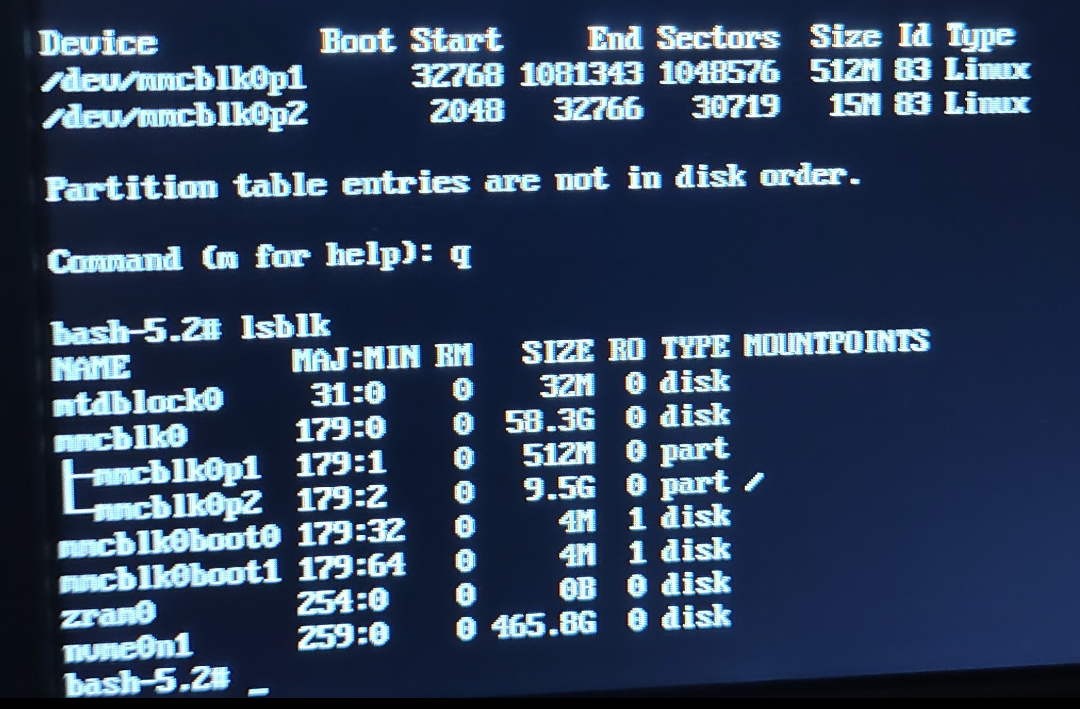
@george Something went wrong in Void Linux. It seams that the flashing was not successful. First boot is ok but lsblk and fdisk are showing different sizes of the partition mmcblk0p2.15 MB in fdisk and 9.5 GB with lsblk. After reboot the 9.5 GB partition is gone and Void is trying to access the 15 MB partition
-
@george said in Any other distro booting?:
@petersen77
The rc.local script actually only performs simple scaling operations, which can be implemented anywhere in the system, such as creating a service yourself.
Regarding GPU issues, it is necessary to compile and install the latest version of Mesa by oneself.Do I need any patches for Mesa? Simply compile the latest or install the mesa-git package from Arch is sufficient?
-
@petersen77
Compile and install mesa24 or higher versions. -
@george Arch is only providing errors while compiling Mesa. Void is running but no drm acceleration or sound. I will give up for now and go back to Debian 13
-
@petersen77
The compilation of Mesa is closely related to the DRM version, so pay attention to the version.