dmesg gives this
[ 1213.459695] usb 7-1.3: new full-speed USB device number 48 using ehci-platform
[ 1213.927560] usb 7-1.3: new full-speed USB device number 49 using ehci-platform
[ 1214.919423] usb 7-1.3: new full-speed USB device number 50 using ehci-platform
[ 1215.427407] usb 7-1.3: new full-speed USB device number 51 using ehci-platform
[ 1215.850028] usb 7-1-port3: unable to enumerate USB device
M
Posts
-
RE: webcam missingposted in PI CM5 Laptop
-
webcam missingposted in PI CM5 Laptop
My laptop webcam is still missing and i read on the crowdsupply page that the camera has a physical disconnection button. where would that be? i only see the shutter. https://www.crowdsupply.com/shenzhen-tianmao-technology/genbook-rk3588
-
RE: Cool Pi Cm5-Laptop Linux Quick Start Guideposted in PI CM5 Laptop
@george any chance you could include the wireguard kernel modules too in these images?
-
RE: Cool Pi Cm5-Laptop Linux Quick Start Guideposted in PI CM5 Laptop
@george any reason this isn't already built in into the published images?
-
RE: edk2-rk3588 UEFI supportposted in PI CM5 Laptop
@petabyte
thats very cool, is there an image ready to test? or can i build one?Okay i managed to build an image but flashing to the board hasnt worked for me yet, how did you go about it?
-
edk2-rk3588 UEFI supportposted in PI CM5 Laptop
Is there a chance you guys are going to support this? https://github.com/edk2-porting/edk2-rk3588
I feel like running generic mainline linux arm images would make the hardware a lot more interesting, and maybe alleviate some of the issues of having to support your own distributions here? -
RE: Tried to update the boot loaderposted in PI CM5 Laptop
@george okay, i tried it again from a bare-metal win machine and that seemed to do the trick, thanks!
Now entering disk mode to write to emmc doesnt seem to work anymore, is there any formatting that needs to be done using the rkdevtool? I tried the formatting through armbian on a usb stick.
-
RE: Tried to update the boot loaderposted in PI CM5 Laptop
@george that’s basically what I’m doing, got the backplate off. There’s also a green led on the SOM that’s glowing green, I thought this means it’s in Maskrom mode too?
-
RE: Tried to update the boot loaderposted in PI CM5 Laptop
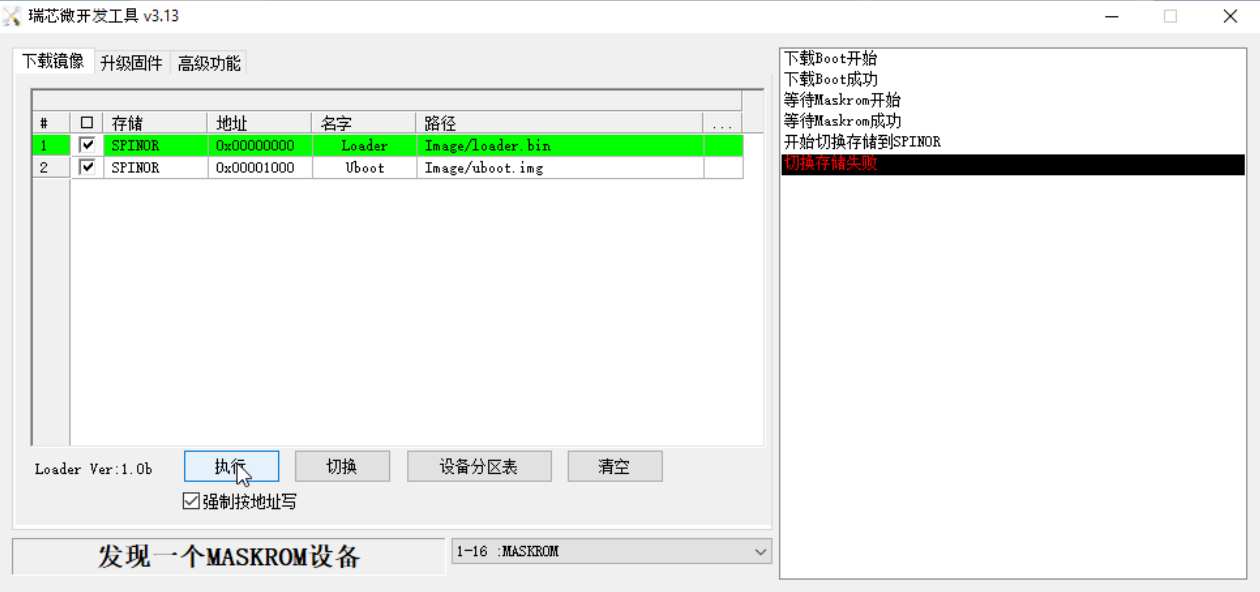
@George tried the tool, that gives me an error
-
Tried to update the boot loaderposted in PI CM5 Laptop
I tried to update the boot loader using dd as described but then the device failed to boot. Using another computer and rkdeveloptool, I tried to flash the spi with the files from onedrive,
rkdeveloptool db */Image/loader.bin
rkdeveloptool wl 0x00001000 */Image/uboot.bin
rkdeveloptool rdbut the laptop still seems to be stuck in maskrom mode.
-
RE: Cool Pi Cm5-Laptop Linux Quick Start Guideposted in PI CM5 Laptop
i was trying to build the kernel, but after following the instructions i only get a blinking cursor on reboot.
-
RE: no webcam/device not foundposted in PI CM5 Laptop
After letting the Laptop rest for a few days, the cam was back shortly, went away after a few seconds though.
-
RE: no webcam/device not foundposted in PI CM5 Laptop
Would love to daily-drive this laptop, but i kinda need a webcam to do that
-
RE: no webcam/device not foundposted in PI CM5 Laptop
@Momo-0 I tested both Pins with and without the LCD cable attached, but I get no connectivity between them and ground. No beeping
-
RE: no webcam/device not foundposted in PI CM5 Laptop
@george is there any chance i could get a replacement screen/camera?
-
RE: no webcam/device not foundposted in PI CM5 Laptop
@George any idea what else I can try? I see no reason the camera would be damaged, im pretty careful around my stuff
-
RE: no webcam/device not foundposted in PI CM5 Laptop
@George tried and older image with kernel 5, and tried to unseat and clan the cable of the monitor with 99% alcohol, still no video device
-
RE: no webcam/device not foundposted in PI CM5 Laptop
@george
Bus 001 Device 001: ID 1d6b:0002 Linux Foundation 2.0 root hub
Bus 002 Device 001: ID 1d6b:0003 Linux Foundation 3.0 root hub
Bus 003 Device 001: ID 1d6b:0002 Linux Foundation 2.0 root hub
Bus 004 Device 001: ID 1d6b:0003 Linux Foundation 3.0 root hub
Bus 005 Device 001: ID 1d6b:0002 Linux Foundation 2.0 root hub
Bus 006 Device 001: ID 1d6b:0001 Linux Foundation 1.1 root hub
Bus 006 Device 002: ID 1c4f:006b SiGma Micro USB Keyboard
Bus 007 Device 001: ID 1d6b:0002 Linux Foundation 2.0 root hub
Bus 007 Device 002: ID 1a86:8091 QinHeng Electronics USB HUB
Bus 007 Device 003: ID 0bda:b85b Realtek Semiconductor Corp. Bluetooth Radioimage is 20241004-ubuntu-24.04-preinstalled-desktop-arm64-laptop-v20
-
no webcam/device not foundposted in PI CM5 Laptop
kernel 6.1.75, i have no video0 device under /dev/ and cheese for example doesn't show a webcam either, any idea?